

Guides
Trading Post
Create buy and sell offers, collect items and coins, cancel unfilled quantities and understand account restrictions.
Guides
Create buy and sell offers, collect items and coins, cancel unfilled quantities and understand account restrictions.
The Trading Post matches player buy and sell offers. Visit the exchange at home to browse items or manage your own listings. Ironman modes, including Group Ironman, cannot use the public exchange. New accounts normally need 15 minutes of playtime before using it, and it is unavailable during Outlast.
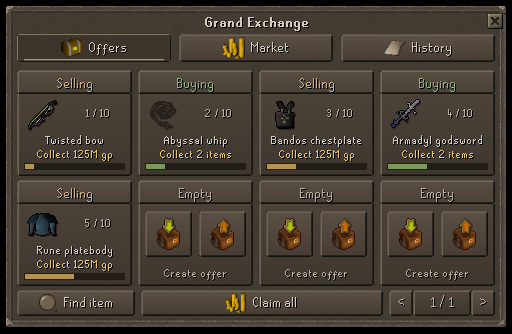
Matching trades execute at the seller's listed price. If your buy price is higher than the matched sell price, the difference becomes a coin refund that you can collect. A buy offer is not a guarantee that another player will supply the item.
Open one of your own offers to view its item and coin balances. Collect the available items, coins or both, or use Collect all for your outstanding balances. Leave enough inventory space. Large coin balances can be represented as platinum tokens at 1 token = 1,000 coins.
Cancel an offer to stop its unfilled remainder. Unsold items from a sell offer, or unspent funds from a buy offer, become available for collection. Completed trades remain completed. Wait for the result message before repeating an action or closing and reopening the exchange.
| Rank | Active sell listings | Active buy listings |
|---|---|---|
| No rank | 6 | 6 |
| Sapphire | 7 | 7 |
| Emerald | 8 | 8 |
| Ruby | 9 | 9 |
| Diamond | 10 | 10 |
| Onyx | 11 | 11 |
| Obsidian | 15 | 15 |
| Dragonite | 15 | 15 |
| Ethereal | 15 | 15 |
Buy and sell limits are checked separately. See Donator Perks for the rank thresholds.
Check whether a price is for one item or the whole quantity. Compare the exact item variant, especially charged, noted, upgraded or ornamented equipment. Untradeable items and coins cannot be listed as ordinary goods. Keep your account PIN secure and follow the trading rules.